The first round of SSH clients for the iPhone presented some problems when connecting to Amazon Web Services EC2 Linux server instances. EC2 instances require a private certificate key file to be used to authenticate to the server during an SSH session. This lead to some workarounds where one had to export the iPhone’s key and add that key to the EC2 server instance. This wasn’t much fun to do. Thankfully, the latest versions of many SSH apps for the iPhone support private key imports. For my example bellow I’m going to be using the iSSH app:
1. Find the .pem key file saved during keypair creation in Amazon Web Services for the instance you launched.
2. Get the the content of the .pem file into the iPhone’s copy/paste memory. There are several ways to do this, here are two of them:
– 2a. Save the pem file to dropbox and open the file on the iPhone using the dropbox app (note you likely need to rename the pem to .txt in order for iOS to allow you to read the file).
– 2b. Open the .pem file with a text editor and copy the contents into a new email to an iPhone account
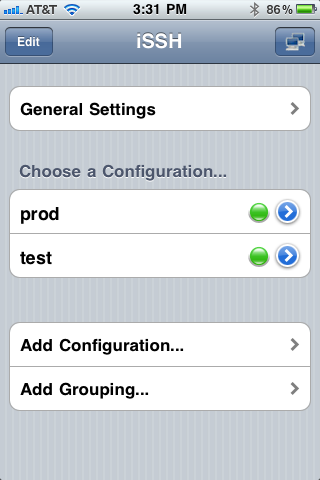
3. Open iSSH, go to General Settings -> Configure SSH Keys -> Import Key…
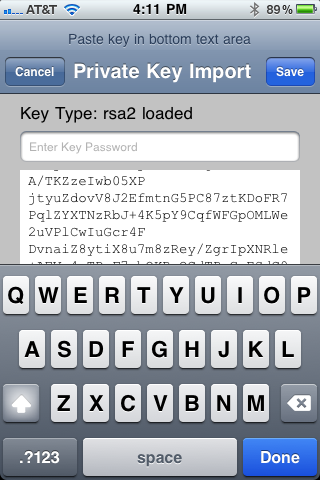
4. Paste the content of the .pem file into the lower text box; ignore the Key Password field unless you have specified one when generating the key separately (Amazon keys don’t typically have passwords).

5. Go back to the iSSH home screen and select Add Configuration…
6. Select the Use Key and select the key file saved earlier.
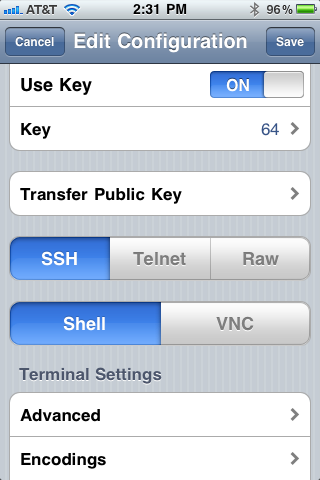
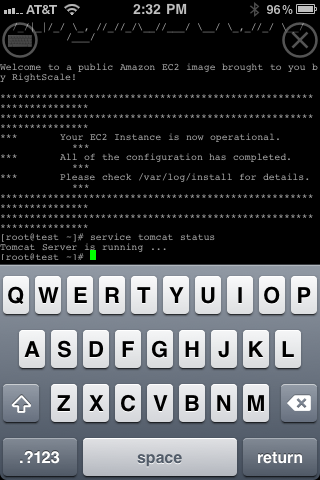
7. Save the configuration and connect to the server instance.
I get: Fatal Error nodename nor servername provided, or not known
Hi Matt,
There are some iSSH support comments that suggest that opening a web page first, then connecting with iSSH will resolve the issue (seems to be more common on Edge/3g/4g rather than wireless):
https://groups.google.com/forum/#!topic/issh/julZn6U4ybE
Thanks,
Chris
I got the program and it looks like it is login in but then always says Connection Failed
Operation timed out
What am i doing wrong?
What do I need as the host port ect?
Thanks Mike
Hi Michael,
Typically the SSH port for linux is 22, however this can be changed (and may already be changed in your linux distro). Make sure you have opened port 22 up in your EC2 security groups (essentially firewall settings) if you are using Amazon EC2.